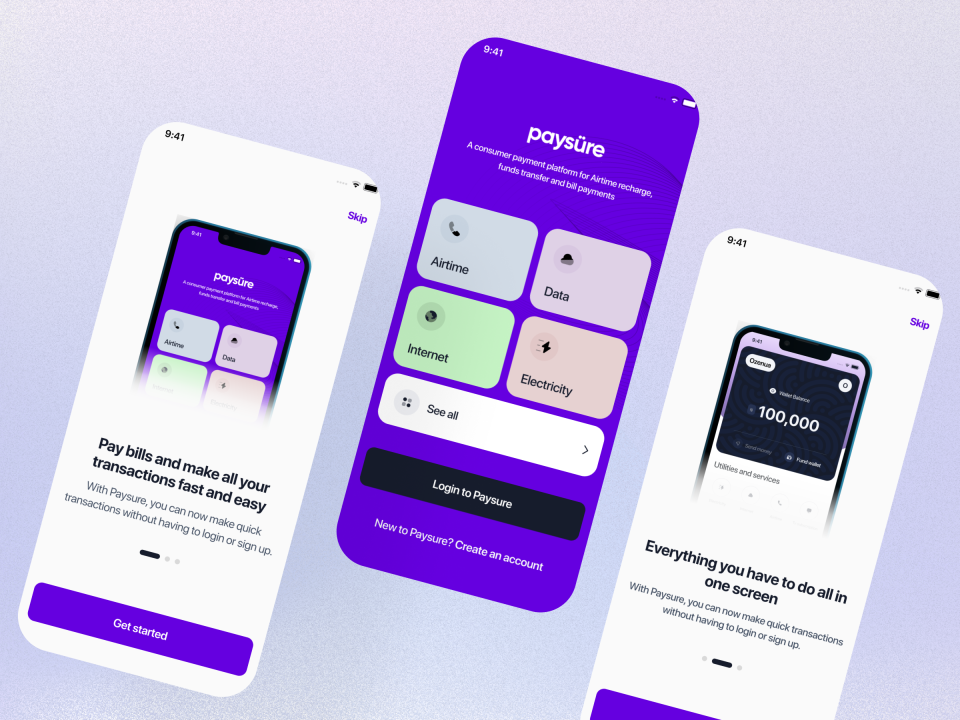
The Art of Designing User Interfaces
Designing user interfaces (UI) is a crucial aspect of creating digital products that are not only visually appealing but also functional and user-friendly. A well-designed UI can enhance the overall user experience and make interactions with a website or application seamless and intuitive.
Understanding User Needs
Before diving into the actual design process, it is essential to understand the needs and preferences of the target users. Conducting user research, creating user personas, and defining user journeys are key steps in designing an interface that caters to the intended audience.
Visual Hierarchy and Layout
Visual hierarchy plays a significant role in guiding users’ attention and prioritising information on the interface. By using different visual elements such as size, colour, contrast, and spacing, designers can create a clear hierarchy that helps users navigate through the interface effortlessly.
Consistency and Simplicity
Consistency in design elements such as typography, colours, icons, and buttons across different screens or pages contributes to a cohesive user experience. Simplicity is also key – eliminating unnecessary elements and focusing on essential features can prevent users from feeling overwhelmed or confused.
Responsive Design
In today’s mobile-centric world, designing responsive interfaces that adapt to various screen sizes and devices is crucial. Responsive design ensures that users have a consistent experience regardless of the device they are using, enhancing accessibility and usability.
User Feedback and Testing
Iterative testing with real users is vital in refining the UI design. Gathering feedback through usability testing sessions allows designers to identify pain points, gather insights for improvement, and ultimately create a more user-centric interface.
Conclusion
In conclusion, designing user interfaces requires a thoughtful blend of creativity, empathy for users, technical skills, and attention to detail. By focusing on user needs, visual hierarchy, consistency, responsiveness, and feedback-driven iteration, designers can create interfaces that not only look great but also provide an exceptional user experience.
9 Advantages of Designing User Interfaces: Enhancing Experience and Engagement
- Enhances user experience
- Improves usability
- Increases user engagement
- Guides users effectively
- Creates a visually appealing interface
- Boosts brand perception
- Facilitates intuitive navigation
- Optimises accessibility for all users
- Supports seamless interactions
Challenges in User Interface Design: Navigating Complexity, Accessibility, and Evolving Trends
- Complex design tools can be overwhelming for beginners.
- Balancing aesthetics with functionality can be challenging.
- Designing for multiple devices and screen sizes adds complexity.
- User preferences and trends may change rapidly, requiring frequent updates.
- Ensuring accessibility for all users, including those with disabilities, can be demanding.
- Feedback from stakeholders or clients may lead to conflicting design decisions.
Enhances user experience
Designing user interfaces enhances user experience by ensuring that interactions with digital products are intuitive, efficient, and enjoyable for the end user. A well-crafted UI considers the needs and preferences of the target audience, leading to interfaces that are easy to navigate, visually appealing, and functionally efficient. By prioritising user experience in UI design, designers can create interfaces that not only meet users’ expectations but also exceed them, ultimately fostering positive interactions and building long-lasting relationships between users and the product or service.
Improves usability
Designing user interfaces significantly enhances usability by creating intuitive layouts, clear navigation paths, and consistent design elements. A well-crafted interface ensures that users can easily understand how to interact with a digital product, locate information efficiently, and complete tasks seamlessly. By prioritising usability in UI design, designers can improve user satisfaction, reduce errors, and ultimately create a positive user experience that encourages engagement and loyalty.
Increases user engagement
Designing user interfaces effectively can significantly boost user engagement with digital products. By creating intuitive layouts, clear navigation paths, and visually appealing designs, users are more likely to interact with the interface in a meaningful way. Engaging interfaces that provide a seamless and enjoyable user experience can lead to increased time spent on a website or application, higher retention rates, and ultimately foster a stronger connection between users and the product or service being offered.
Guides users effectively
Designing user interfaces effectively guides users through digital experiences by strategically arranging elements, prioritising information, and creating intuitive navigation paths. By establishing a clear visual hierarchy and incorporating user-friendly design principles, interfaces can direct users towards their goals efficiently. This proactive approach not only enhances usability but also ensures that users can easily find what they are looking for, ultimately improving their overall satisfaction and engagement with the product or service.
Creates a visually appealing interface
Creating a visually appealing interface is a key pro of designing user interfaces. Aesthetically pleasing design elements such as colour schemes, typography choices, imagery, and layout can significantly enhance the overall look and feel of a digital product. A visually engaging interface not only captures users’ attention but also conveys a sense of professionalism and credibility. By incorporating visual appeal into the design process, designers can create interfaces that not only attract users but also leave a lasting positive impression, ultimately contributing to a more enjoyable and memorable user experience.
Boosts brand perception
Designing user interfaces not only enhances the functionality and usability of digital products but also plays a significant role in boosting brand perception. A well-crafted UI that reflects the brand’s identity through consistent use of colours, typography, and visual elements can leave a lasting impression on users. By creating an interface that aligns with the brand’s values and aesthetics, designers can evoke positive emotions and build trust with users, ultimately enhancing the overall perception of the brand.
Facilitates intuitive navigation
Facilitating intuitive navigation is a significant advantage of designing user interfaces. By carefully structuring and organising elements within an interface, designers can guide users seamlessly through the digital environment. Intuitive navigation enhances user experience by reducing cognitive load, enabling users to find information or complete tasks efficiently and with minimal effort. Clear signposts, logical grouping of content, and intuitive placement of interactive elements contribute to a user-friendly interface that ensures smooth and intuitive navigation for users.
Optimises accessibility for all users
Designing user interfaces optimises accessibility for all users by ensuring that digital products are inclusive and usable by individuals with diverse needs and abilities. Through thoughtful design choices such as clear navigation, legible typography, intuitive interactions, and adherence to web accessibility standards, UI designers can create interfaces that cater to a wide range of users, including those with visual or motor impairments. By prioritising accessibility in UI design, designers contribute to a more inclusive digital experience where everyone can access and interact with content effectively.
Supports seamless interactions
Designing user interfaces supports seamless interactions by creating intuitive layouts and navigation paths that enable users to engage with digital products effortlessly. A well-designed interface anticipates user needs, guides them through tasks with clarity, and minimises cognitive load, resulting in a smooth and efficient user experience. By prioritising usability and interaction design principles, user interfaces facilitate seamless interactions that enhance user satisfaction and overall usability of the product.
Complex design tools can be overwhelming for beginners.
Complex design tools can pose a significant challenge for beginners venturing into the world of designing user interfaces. The steep learning curve and intricate features of these tools can be overwhelming, hindering newcomers from effectively translating their creative vision into tangible designs. Navigating through a myriad of options and functionalities may lead to confusion and frustration, potentially discouraging individuals from pursuing UI design. Simplifying the onboarding process and providing adequate resources and support can help alleviate this con and empower beginners to gradually master the complexities of design tools.
Balancing aesthetics with functionality can be challenging.
Balancing aesthetics with functionality in designing user interfaces can present a significant challenge. While it is essential for a UI to be visually appealing to attract users and create a positive first impression, prioritising aesthetics over functionality can hinder the overall user experience. Striking the right balance between a visually pleasing design and intuitive usability requires careful consideration of elements such as layout, colour scheme, typography, and interactive components. Designers must ensure that the interface not only looks good but also functions seamlessly to meet users’ needs effectively. This delicate balance demands thoughtful decision-making and iterative testing to create interfaces that are both visually engaging and highly functional.
Designing for multiple devices and screen sizes adds complexity.
Designing user interfaces for multiple devices and screen sizes introduces a significant challenge due to the complexity it brings. Ensuring that the interface remains visually appealing and functional across various devices requires careful consideration of responsive design principles and adaptability. Designers must account for different screen resolutions, aspect ratios, and interaction methods, which can complicate the design process and testing phase. Balancing consistency and usability while accommodating diverse device specifications poses a conundrum that demands meticulous attention to detail and thorough testing to deliver a seamless user experience on all platforms.
User preferences and trends may change rapidly, requiring frequent updates.
In the realm of designing user interfaces, a notable challenge arises from the ever-evolving nature of user preferences and trends. User behaviours and expectations can shift swiftly in response to technological advancements, changing design conventions, or emerging industry standards. This dynamic landscape necessitates designers to stay vigilant and adaptable, often requiring frequent updates to UI designs to ensure they remain relevant and resonate with users. Failure to keep pace with these rapid changes may result in interfaces that feel outdated or disconnected from users’ evolving needs and preferences.
Ensuring accessibility for all users, including those with disabilities, can be demanding.
Ensuring accessibility for all users, including those with disabilities, can be demanding. Designing user interfaces that are inclusive and cater to a diverse range of needs and abilities requires careful consideration of factors such as screen readers compatibility, colour contrast for visually impaired users, keyboard navigation for those with motor impairments, and overall usability for individuals with cognitive disabilities. Meeting these accessibility standards adds complexity to the design process and may involve additional time and resources to ensure that the interface is truly accessible to all users.
Feedback from stakeholders or clients may lead to conflicting design decisions.
When designing user interfaces, a significant challenge arises from the potential for conflicting design decisions stemming from feedback provided by stakeholders or clients. While feedback is essential for refining and improving the interface, differing opinions and preferences among stakeholders can sometimes lead to design compromises that may not align with the original vision or user needs. Balancing stakeholder input with design principles and user-centric considerations becomes crucial in navigating this conundrum to ensure that the final UI design maintains coherence and effectiveness in addressing user requirements.