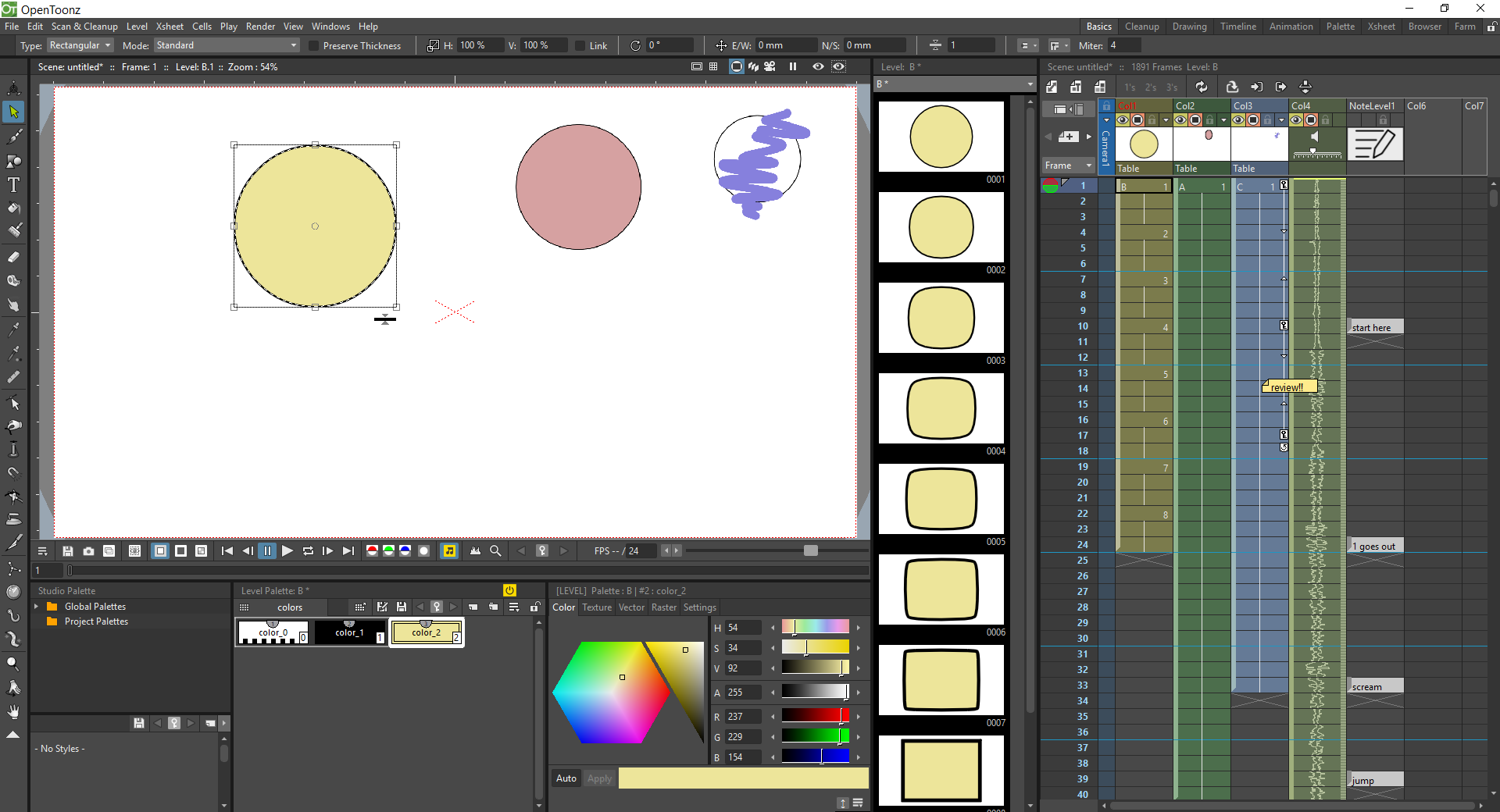
Exploring OpenToonz: A Powerful Animation Software
OpenToonz is a versatile open-source animation software that has gained popularity among animators and artists for its robust features and flexibility. Developed by Digital Video S.p.A. and maintained by the Toonz Foundation, OpenToonz offers a wide range of tools for creating 2D animations, whether you are a beginner or a seasoned professional.
Key Features of OpenToonz:
- Vector and Raster Tools: OpenToonz supports both vector and raster-based workflows, allowing users to create animations with precision and detail.
- Effects and Filters: The software comes equipped with a variety of effects and filters that can enhance the visual appeal of your animations.
- Bone Rigging System: With its bone rigging system, animators can easily create complex character animations with smooth movement.
- Timeline and Xsheet: OpenToonz offers a timeline and Xsheet interface for managing keyframes, timing, and sequencing of animation elements.
- Integration with Other Software: The software supports integration with other popular tools such as Blender, making it easier to incorporate 3D elements into your 2D animations.
The Benefits of Using OpenToonz:
Whether you are creating animated shorts, web series, or educational videos, OpenToonz provides a range of benefits that can streamline your animation workflow:
- Cost-Effective: As an open-source software, OpenToonz is available for free, making it an accessible option for artists on a budget.
- Flexible Workflow: The software’s versatile features cater to different animation styles and techniques, giving users the freedom to experiment and innovate.
- Community Support: OpenToonz has a dedicated community of users who share tips, tutorials, and resources to help each other master the software.
- Cross-Platform Compatibility: Whether you are using Windows, macOS, or Linux, OpenToonz is compatible across multiple operating systems.
If you are looking to dive into the world of 2D animation or expand your existing skill set, consider exploring the capabilities of OpenToonz. With its powerful features and user-friendly interface, this software opens up endless possibilities for creating captivating animations that resonate with audiences worldwide.
Mastering Opentoonz: 7 Essential Tips for Animators
- Use vector-based drawing tools for clean and smooth lines.
- Take advantage of the various animation tools like onion skinning and keyframing.
- Organize your project files into folders to keep everything neat and accessible.
- Experiment with different brush settings to find the style that works best for you.
- Utilize the colour palette feature to easily manage and apply colours to your drawings.
- Watch tutorials and seek advice from other Opentoonz users to improve your skills.
- Regularly save your work to prevent any potential loss of data.
Use vector-based drawing tools for clean and smooth lines.
When working with OpenToonz, a valuable tip to enhance the quality of your animations is to utilise the vector-based drawing tools for creating clean and smooth lines. By leveraging these tools, animators can achieve precise and polished line work that adds a professional touch to their creations. Vector-based drawing tools offer greater control over line thickness and consistency, resulting in animations that appear crisp and visually appealing. Incorporating this technique into your workflow can elevate the overall look of your animated projects in OpenToonz.
Take advantage of the various animation tools like onion skinning and keyframing.
To make the most of your animation projects in OpenToonz, it is essential to utilise the diverse range of animation tools available, such as onion skinning and keyframing. Onion skinning allows animators to see multiple frames simultaneously, aiding in creating smooth transitions and maintaining consistency in movement. Keyframing enables precise control over animation by setting key points for objects or characters at different stages, facilitating the creation of dynamic and engaging sequences. By incorporating these tools effectively, animators can enhance the quality and fluidity of their animations within OpenToonz.
Organize your project files into folders to keep everything neat and accessible.
When working with OpenToonz, it is recommended to organise your project files into folders to maintain a tidy and easily accessible workspace. By categorising your assets, such as images, audio files, and project documents, into separate folders, you can streamline your workflow and locate specific elements efficiently. This organisational practice not only helps in keeping track of your project’s components but also ensures that you can focus on the creative aspects of animation without being overwhelmed by cluttered files.
Experiment with different brush settings to find the style that works best for you.
When using OpenToonz, it is beneficial to experiment with various brush settings to discover the style that complements your artistic vision. By adjusting parameters such as brush size, opacity, and texture, you can tailor the brush tool to suit your preferences and achieve the desired visual effect in your animations. Embracing this creative exploration allows you to develop a unique and personalised approach to digital drawing and painting within the software, enhancing the overall quality and distinctiveness of your animated creations.
Utilize the colour palette feature to easily manage and apply colours to your drawings.
Utilize the colour palette feature in OpenToonz to streamline the process of managing and applying colours to your drawings effortlessly. By taking advantage of this tool, you can create and save custom colour swatches, ensuring consistency across your artwork. Whether you are working on character designs, backgrounds, or special effects, the colour palette feature in OpenToonz offers a user-friendly way to enhance the visual appeal of your animations with precision and efficiency.
Watch tutorials and seek advice from other Opentoonz users to improve your skills.
To enhance your proficiency in using OpenToonz, it is advisable to watch tutorials and engage with fellow users of the software for valuable insights and guidance. By learning from tutorials and seeking advice from experienced OpenToonz users, you can acquire new techniques, troubleshoot challenges more effectively, and broaden your skill set in animation. Collaborating with the OpenToonz community not only fosters a supportive learning environment but also opens up opportunities for creative growth and innovation in your animation projects.
Regularly save your work to prevent any potential loss of data.
It is crucial to regularly save your work while using OpenToonz to prevent any potential loss of data. By saving your progress frequently, you can safeguard your animations and projects from unexpected software crashes or system failures. This simple yet essential tip ensures that your hard work is securely stored, allowing you to focus on your creative process without the fear of losing valuable work. Remember, a few seconds spent saving your work can save you hours of frustration in the long run.