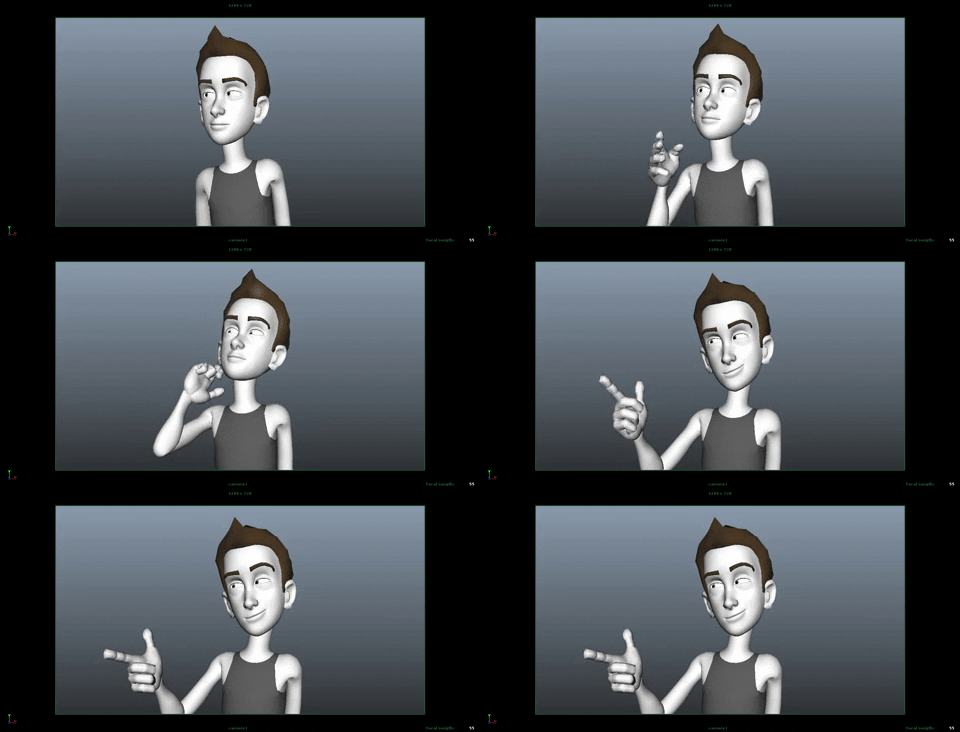
Creating Animation: From First Idea to Final Frame
Animation brings drawings, objects and ideas to life by creating the illusion of movement. It can tell a story, explain a process or simply delight an audience. Whether you are making a short film, a motion graphic or a looping social media clip, the process usually begins with a clear idea and develops through careful planning, experimentation and refinement.
Start with an idea
Before opening animation software, decide what the animation needs to communicate. A simple concept is often more effective than a complicated one, particularly for a short piece. Consider who will watch it, where it will be seen and what you want the audience to understand or feel.
Write a brief description of the idea, then identify its essential moments. If the animation is intended to explain something, list the key points in order. If it is a story, think about the character, their goal and the change that takes place.
Plan the sequence
A storyboard is a useful way to map out an animation before production begins. It can be made from rough sketches, simple shapes or photographs. Each panel represents an important shot or action, helping you consider composition, timing and transitions.
You do not need to draw beautifully. The purpose is to make the sequence understandable and to spot problems early. For more complex projects, create an animatic: a basic video made by putting storyboard images together with temporary timing, dialogue or sound. This gives you a sense of the pace before you invest time in finished artwork.
Choose an animation technique
The best technique depends on the project, the available time and the visual style you want. Common approaches include:
- 2D animation: Images are created in two dimensions and moved frame by frame or with digital rigs.
- 3D animation: Objects and characters are built in a digital three-dimensional space, then posed, lit and animated.
- Stop motion: Physical objects are moved in small increments and photographed one frame at a time.
- Motion graphics: Text, shapes and graphic elements move to communicate information or create a visual mood.
Each method has its own strengths. A hand-drawn sequence can feel expressive and personal, while motion graphics can make information clear and engaging. Stop motion offers a tactile quality, and 3D animation allows the camera and objects to move through a simulated space.
Build the movement
Animation is more than moving an object from one place to another. Believable movement depends on timing, spacing and intention. Timing is the number of frames used for an action; spacing is how far an object travels between those frames. Together, they affect whether a movement feels heavy, light, quick or slow.
Start with the main poses, often called keyframes. These show the most important positions in an action, such as the beginning, the point of greatest effort and the final pose. Add the poses between them to create smoother movement. Many animation programmes can generate these in-between frames, but they still need careful adjustment to look natural.
Pay attention to the principles of animation, including anticipation, follow-through and easing. A character may bend before jumping to prepare the audience for the action. A loose sleeve may continue moving after an arm has stopped. An object may accelerate gradually rather than starting and stopping abruptly. Small details such as these can make movement feel more convincing.
Use sound with purpose
Sound can shape the rhythm and atmosphere of an animation. Dialogue, music and sound effects may help clarify an action or create an emotional response. If the animation includes speech, record or plan the dialogue early so that the visuals can be timed to it. For a silent animation, movement and visual cues need to carry the message on their own.
Make sure you have permission to use any music or sound effects in your project. When possible, create original audio or choose material with a licence that suits the intended use.
Review and refine
Watch the animation repeatedly, but also take breaks between reviews. Fresh eyes can make it easier to notice unclear actions, awkward pauses or inconsistent movement. Ask someone who has not seen the project before to watch it and explain what they think is happening. Their response can reveal whether the animation communicates as intended.
Refine the work in stages. First check the overall sequence and timing. Then review individual movements, followed by details such as colour, lighting, typography and sound. This approach helps prevent time being spent polishing a scene that may need to change.
Export and share
Before exporting, check the intended platform’s requirements for dimensions, frame rate, file format and file size. Watch the exported file from beginning to end, as technical problems may only become apparent outside the editing programme. Keep a high-quality master copy as well as versions optimised for different platforms.
Keep practising
Creating animation combines design, storytelling and technical skill. The first attempt does not need to be ambitious: a bouncing ball, a moving title or a short looping character action can teach valuable lessons about timing and movement. By planning carefully, testing ideas and refining the result, you can develop both your technique and your visual voice—one frame at a time.
8 Essential Tips for Crafting Engaging Animations
- Start with a clear idea and simple storyboard.
- Keep character designs consistent.
- Use reference footage to study movement.
- Plan timing before adding detail.
- Use squash and stretch to add life.
- Keep the action easy to read.
- Add sound effects to support the motion.
- Review, refine and get feedback.
Start with a clear idea and simple storyboard.
Start with a clear idea and a simple storyboard to give your animation direction before you begin creating it. Decide what you want the audience to understand or feel, then sketch the key moments in sequence. The drawings do not need to be detailed; even rough shapes can help you plan the action, timing and transitions, spot gaps in the story and make changes early.
Keep character designs consistent.
Keep character designs consistent throughout your animation so that viewers can recognise each character in every scene and pose. Create a simple reference sheet showing key details such as proportions, colours, clothing and distinctive features, then use it as a guide while drawing or modelling. Check the design from different angles and in different expressions, and make sure any changes are intentional. Consistency helps your characters feel believable and makes the finished animation look more polished.
Use reference footage to study movement.
Use reference footage to understand how movement works in real life. Record yourself or observe people, animals and objects, paying attention to timing, balance, weight and the small details that make an action feel natural. You do not need to copy the footage exactly; use it as a guide to create more convincing, expressive animation.
Plan timing before adding detail.
Plan the timing before adding detail by deciding how long each action should take and where pauses or changes in pace belong. A quick storyboard or rough animatic can help you test the rhythm and make sure the sequence feels clear before you polish characters, backgrounds or effects. Getting the timing right early can save considerable work later, as detailed animation is much harder to adjust once every frame has been refined.
Use squash and stretch to add life.
Use squash and stretch to make movement feel lively and expressive. When an object moves or lands, it can squash slightly on impact, then stretch as it springs away; this suggests weight, speed and flexibility. Keep its overall volume consistent so it deforms rather than appearing to change size. Even subtle squash and stretch can add energy and personality to a character or object.
Keep the action easy to read.
Keep the action easy to read by making each movement clear and giving the audience time to understand what is happening. Avoid crowding the frame with too many actions at once, and use strong poses, clear spacing and deliberate timing to guide the viewer’s eye. When an action matters, make its beginning, direction and outcome easy to distinguish; a brief pause or a simple change in composition can help bring attention to the key moment.
Add sound effects to support the motion.
Adding sound effects can make animated movement feel more vivid and convincing. A soft whoosh can emphasise a quick turn, while a light tap or thud can give an object’s landing more impact. Choose sounds that match the action and its timing, and keep the volume balanced so they support rather than distract from the visuals. Even subtle effects can help guide the audience’s attention and make each movement feel more engaging.
Review, refine and get feedback.
Reviewing your animation is an essential part of the creative process. Watch it several times to check that the movement feels natural, the timing works and the message is clear. Refine any awkward transitions or distracting details, then ask someone unfamiliar with the project for feedback; a fresh perspective can reveal issues you may have missed. Use their comments to guide improvements while keeping the original purpose and style of your animation in mind.