Flask Web Framework Tutorial: Build a Simple Website with Python
Flask is a lightweight web framework for Python. It provides the essentials for building web applications, including URL routing, request handling and template rendering, while leaving many design choices in the developer’s hands. This tutorial covers the basics by creating a small website with a home page, a dynamic route and an HTML template.
Set up a project
Install Python, then create a project directory and a virtual environment. A virtual environment keeps the project’s dependencies separate from other Python applications.
mkdir flask-tutorial


cd flask-tutorial


python -m venv .venv
Activate the environment. On macOS or Linux, run:
source .venv/bin/activateOn Windows, run:
.venv\Scripts\activateInstall Flask with pip:
pip install Flask
Create your first Flask application
Create a file called app.py and add the following code:
from flask import Flask


app = Flask(__name__)


@app.route("/")


def home():


    return "Hello, Flask!"


if __name__ == "__main__":


    app.run()
Flask(__name__) creates the application. The @app.route("/") decorator connects the website’s root URL to the home function. When someone visits that URL, Flask calls the function and returns its response.
Start the development server with:
python app.pyOpen the local address shown in the terminal, usually http://127.0.0.1:5000/. Stop the server with Ctrl+C.
Add more routes
Routes can include variable parts. For example, this route greets a visitor using a name in the URL:
@app.route("/hello/<name>")


def hello(name):


    return f"Hello, {name}!"
Visit /hello/Alex to see the result. Flask passes the value from the URL to the function as the name argument.
You can also specify the type of a route variable. This example accepts an integer:
@app.route("/posts/<int:post_id>")


def show_post(post_id):


    return f"Post number {post_id}"
Use HTML templates
Returning HTML directly from Python is fine for a tiny example, but templates make it easier to keep page content separate from application logic. Create a folder called templates, then add a file named home.html:
<!doctype html>


<html lang="en-GB">


<head>


  <meta charset="utf-8">


  <meta name="viewport" content="width=device-width, initial-scale=1">


  <title>Flask Tutorial</title>


</head>


<body>


  <h1>Welcome to Flask</h1>


  <p>This page is rendered from a template.</p>


</body>


</html>
Update app.py to render the template:
from flask import Flask, render_template


app = Flask(__name__)


@app.route("/")


def home():


    return render_template("home.html")


if __name__ == "__main__":


    app.run()
Flask looks for templates in the templates directory. Templates use Jinja, which can insert values and display content conditionally or repeatedly.
For example, pass a value from a route to a template:
@app.route("/hello/<name>")


def hello(name):


    return render_template("hello.html", visitor=name)
Create templates/hello.html:
<h1>Hello, {{ visitor }}!</h1>Jinja automatically escapes many values rendered inside templates, helping to reduce the risk of HTML injection. Avoid marking untrusted content as safe.
Add static files
CSS, JavaScript and image files belong in a folder named static. For example, create static/style.css and add:
body {


  font-family: sans-serif;


  margin: 2rem;


}
Link to the stylesheet from a template using Flask’s url_for function:
<link rel="stylesheet" href="{{ url_for('static', filename='style.css') }}">
Handle forms and requests
Flask routes accept GET requests by default. To process a form submission, allow POST requests as well and read the submitted data with request.
Add this route to app.py:
from flask import Flask, render_template, request


app = Flask(__name__)


@app.route("/contact", methods=["GET", "POST"])


def contact():


    if request.method == "POST":


        message = request.form.get("message", "")


        return f"Your message has {len(message)} characters."


    return render_template("contact.html")


if __name__ == "__main__":


    app.run()
Create templates/contact.html:
<form method="post">


  <label for="message">Message</label>


  <textarea id="message" name="message" required></textarea>


  <button type="submit">Send</button>


</form>
This is a basic demonstration. Real forms should validate input and use CSRF protection, often provided by an extension such as Flask-WTF. Avoid displaying user-submitted content without appropriate escaping.
Organise the application
A small project can start with this structure:
flask-tutorial/


├── app.py


├── templates/


│   ├── home.html


│   ├── hello.html


│   └── contact.html


└── static/


    └── style.css
As an application grows, its routes, configuration and data access can be separated into modules. Flask’s application factory pattern and blueprints are useful ways to organise larger projects.
Development and production
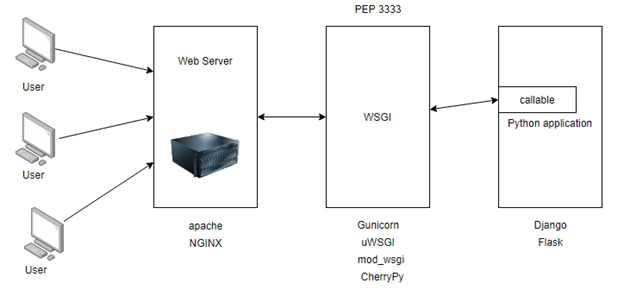
Flask’s built-in server is intended for local development, not for serving a live website. Debug mode can reveal detailed information about errors, so it must not be enabled in production. For deployment, use a production-ready WSGI server and follow Flask’s deployment guidance.
Applications that use sessions or other signed data also need a securely managed secret key. Store sensitive configuration outside the source code, such as in environment variables, and do not commit secrets to version control.
Next steps
This tutorial introduced Flask’s core ideas: routes connect URLs to Python functions, templates generate HTML, and request objects provide access to incoming data. From here, useful topics include form validation, database integration, user authentication, automated testing and deployment.
Essential FAQs for Beginners: A Comprehensive Guide to the Flask Web Framework
- What is Flask, and what is it used for?
- How do I install Flask and set up a project?
- How do I create and run a basic Flask application?
- How do routes and URL variables work in Flask?
- How do I render HTML templates with Flask?
- How do I handle forms and user input in Flask?
- How do I add CSS, JavaScript and images to a Flask application?
- How do I deploy a Flask application safely to production?
What is Flask, and what is it used for?
Flask is a lightweight web framework for Python, used to build websites, web applications and APIs. It provides essentials such as URL routing, request handling and template rendering, while allowing developers to choose additional tools—such as database or authentication libraries—as their project grows.
How do I install Flask and set up a project?
To install Flask, create a project folder, open a terminal in it and set up a virtual environment with python -m venv .venv. Activate it (source .venv/bin/activate on macOS or Linux, or .venv\Scripts\activate on Windows), then run pip install Flask. Create an app.py file for your application, and start the development server with python app.py. Keeping Flask inside a virtual environment helps separate your project’s dependencies from other Python projects.
How do I create and run a basic Flask application?
To create a basic Flask application, install Flask with pip install Flask, then create an app.py file containing from flask import Flask, app = Flask(__name__), and a route such as @app.route("/") that returns “Hello, Flask!”. Run the application from your terminal with python app.py, then open the local address shown—usually http://127.0.0.1:5000/—in your browser.
How do routes and URL variables work in Flask?
In Flask, routes connect URLs to Python functions using the @app.route() decorator. A route can include a variable segment, such as /users/<username>; Flask captures the value from the URL and passes it to the matching function as an argument. You can specify a type converter too, for example /posts/<int:post_id>, so Flask accepts an integer and passes it as an integer. Use url_for() to build URLs from endpoint names and variable values, helping keep links correct if routes change.
How do I render HTML templates with Flask?
To render HTML templates with Flask, create a templates folder in your project and save your HTML files there. Import render_template from Flask, then call it in a route—for example, return render_template("index.html"). You can also pass values to the template, such as render_template("hello.html", name="Sam"), and display them in the HTML using Jinja syntax: {{ name }}.
How do I handle forms and user input in Flask?
In Flask, handle form submissions by allowing the route to accept both `GET` and `POST` requests, then read submitted values from `request.form`. Validate and sanitise input on the server before using it, and return helpful feedback if information is missing or invalid. For added security and convenience, consider Flask-WTF, which provides form validation and CSRF protection. When displaying user input, rely on template auto-escaping and avoid treating untrusted content as safe.
How do I add CSS, JavaScript and images to a Flask application?
Place CSS, JavaScript and image files in a folder named static in your Flask project. For example, reference a stylesheet in a template with <link rel="stylesheet" href="{{ url_for('static', filename='style.css') }}">, or an image with <img src="{{ url_for('static', filename='images/logo.png') }}" alt="Logo">. Using Flask’s url_for function helps generate the correct URL to each file.
How do I deploy a Flask application safely to production?
To deploy a Flask application safely, use a production-ready WSGI server, such as Gunicorn or Waitress, rather than Flask’s built-in development server, and make sure debug mode is disabled. Store the secret key and other sensitive settings in environment variables or a secrets manager, serve the site over HTTPS, and configure your web server and firewall appropriately. Validate user input, use CSRF protection for forms, keep Flask and its dependencies up to date, and run the application with only the permissions it needs. Before launch, test the production configuration and check Flask’s official deployment guidance for your hosting environment.